
Our own product · beenaIT Portal
People, pay, and billing in one place, with AI built in
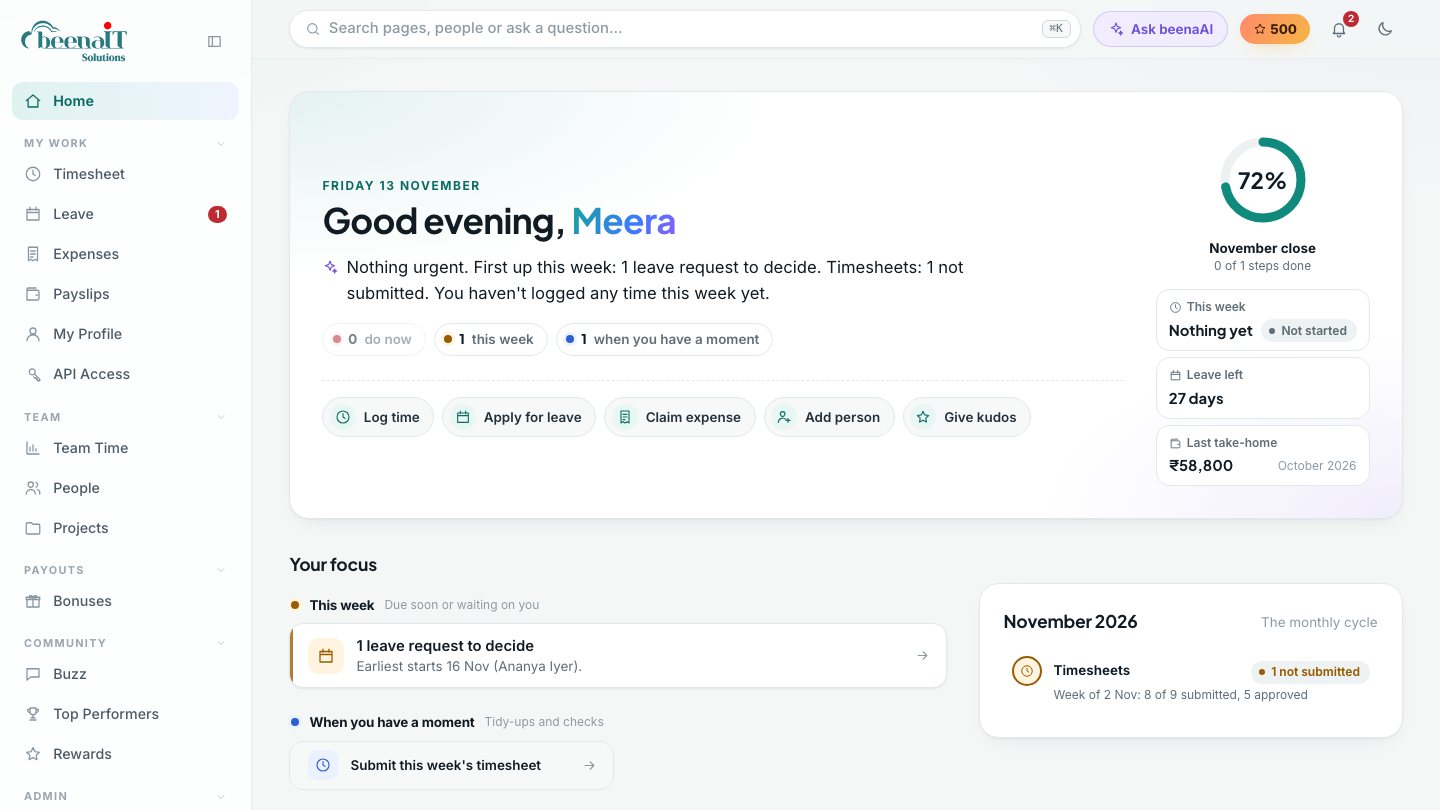
We built the beenaIT Portal to run our own company across the UK and India, replacing the spreadsheets we used for timesheets, payroll, and invoicing. It is headless, so every feature also works from a command line and from AI assistants through MCP. Soon we are opening it to other companies.
Built for us first
The simplicity of a spreadsheet, the controls of a product
Our payroll used to live in a monthly sheet: one row per person, a few formulas, and a lot of copying. The portal keeps that shape. Each month is one sheet you can read at a glance, with the numbers you type in blue and everything else calculated, but every change now has an owner, an approval, and a record.
Each page has a short guide for your role, and beenaAI answers questions in plain language, such as who is on leave this week, which invoices are overdue, or how to onboard a new employee.
What it does
Everything between a new joiner and a paid invoice
Each person sees only what their role needs: their own week and payslips for staff, approvals for managers, and the whole month for HR and finance.
People and onboarding
Add a person in one form: role, pay, manager, and an invite. Employees, freelancers, and vendor-supplied people in one directory.
Timesheets and leave
Log hours by project, apply for leave by the half day, and approve both from one inbox. Holidays and leave fill the week for you.
Payroll
A monthly pay sheet that reads like the spreadsheet it replaces, with PF, ESIC, professional tax, and TDS worked out, payslips for everyone, and arrears and bonuses on the same sheet.
Payouts
Freelancer invoices checked against approved timesheets, vendor bills, bonuses, and expense claims, each with a maker and a checker.
Billing and collections
Invoices from approved hours and bill rates, in more than one currency, with payments received and overdue amounts tracked.
Filings and finance
A calendar of statutory due dates, tax deducted, profit and loss by project, and partner shares.
Community
A team feed for wins and announcements, kudos, a leaderboard, and points people can spend on rewards.
Security
Two-step sign-in, twelve roles that each see only their part, encrypted personal data, and an audit log of every change.
Headless by design
Use it from the browser, the terminal, or your AI assistant
Every feature in the portal is also available through a secure API. Each person makes their own token, and anything done with it runs with exactly their permissions and is recorded under their name.
- 1The portalThe web app your team uses every day
- 2Personal API tokensMade by each person; same permissions as their login
- 3JSON API17 queries and 104 actions, from logging time to running payroll
- 4Command linebeenait inbox, beenait log-time, beenait run …
- 5MCP serverClaude, Cursor, and other AI assistants use the portal as tools
$ beenait inbox
◐ 2 timesheets to approve  —  week of 9 Nov
○ 1 expense claim waiting

$ beenait log-time --hours 8 --project "CRM"
8h on 2026-11-13 for CRM. Saved as draft.

$ beenait ask "which invoices are overdue?"
$ claude mcp add beenait -- beenait-mcp

> Approve this week's timesheets for my team
  and tell me who hasn't submitted yet.
How we built it
A modern stack, with AI in the product and in the workflow
We designed and built the portal ourselves, page by page with the people who use it, and used AI coding assistants throughout. It is the same approach we take on client products.
Start from the work
We mapped how timesheets, payroll, and invoicing really ran in our spreadsheets before designing a single page.
Safe by default
Roles, two-step sign-in, encrypted personal data, maker and checker approvals, and an audit trail from day one.
AI where it helps
beenaAI answers from live data and the page guides. MCP lets any assistant do real work, with a person approving what matters.
Open, not locked in
One API serves the portal, the command line, and AI tools, so it connects to the systems you already use.
Coming soon for your company
We’re opening the portal to other companies
If you run a services business or a growing team in the UK or India and still manage timesheets, payroll, or contractor payments in spreadsheets, join the early access list. We’re onboarding a small number of companies first and shaping the product with them.
- Your own company space with your entities, rules, and holidays
- Help moving from spreadsheets: people, opening balances, and a side-by-side payroll check
- Onboarding sessions for HR, finance, managers, and staff
- The API, command line, and MCP server from day one
- A direct line to the team that builds it
Have a project, a product idea, or a hiring gap?
Tell us what you need and the right specialist from our team will get back to you. Or ask our AI assistant right now.